Epomaker LEOBOG HI8 SE vs IROK FE75 Pro
Two of our picks from Best Mechanical Keyboards for the Money, compared side by side on the specs and trade-offs that actually matter.
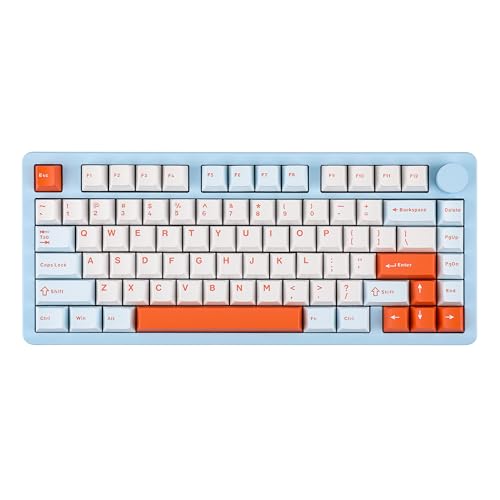

Specs head to head
| Spec | Epomaker LEOBOG HI8 SE | IROK FE75 Pro |
|---|---|---|
| Layout | 75% (80 keys) | 75% (81 keys) |
| Case | CNC 6063 aluminum | n/a |
| Mount | Gasket (PORON) | n/a |
| Connectivity | Wired, Bluetooth, 2.4GHz | Wired, 2.4GHz, Bluetooth 5.0 |
| Hot-swap | Yes, 3-pin and 5-pin | Yes, 3-pin and 5-pin |
| Keycaps | Double-shot PBT, Cherry profile | ABS, OEM profile |
| Battery | 8000 mAh | 3800 mAh |
| Weight | ~1.7 kg | n/a |
| Switches | n/a | IROK factory-lubed (linear) |
| Dampening | n/a | Three-layer silicone |
| RGB | n/a | Per-key, 16.8M colors |
Our take on each
Epomaker LEOBOG HI8 SE
Best for: Typists and casual gamers who want a custom-keyboard feel and sound for around $100.
The HI8 SE is the one that feels like a luxury the moment you pick it up. The case is full CNC aluminum, not plastic pretending to be metal, and at roughly a hundred dollars that is borderline unfair to the competition. The payoff is the sound: a gasket mount with foam, films, and a flex-cut PCB gives it that creamy, marbly thock enthusiasts chase.
Pre-lubed linear switches and a big 8000mAh battery mean it is smooth to type on and lasts ages between charges, and it is hot-swap so you can retune the feel whenever.
Know what it is not. At about 1.7kg it is a desk anchor, not a travel board, and the software is Windows-only with no VIA or QMK, so deep remapping is off the table. It is also tuned for typing and casual gaming rather than competitive FPS. As a budget taste of the custom-keyboard world, though, it is a knockout.
IROK FE75 Pro
Best for: First-timers who want a cheap, tri-mode, hot-swap board to learn and tinker on.
The FE75Pro is almost suspiciously cheap for what it is: a 75% wireless board with Bluetooth, 2.4GHz, and USB-C, plus true hot-swap sockets that take 3-pin and 5-pin switches. It often sells around the price of a nice dinner, which makes it the easy answer to 'how do I try mechanical keyboards without committing.'
Three layers of silicone dampening give it a cleaner, quieter sound than you would expect down here, and owners consistently call the hardware solid with a stable spacebar.
Two honest caveats. The keycaps are ABS, so they will shine up over time, and the bundled software is genuinely bad, with users warning it behaves like junkware. The good news is you never need it. Treat this as a superb hot-swap starter and you will be grinning.
More from this guide
We may earn a commission from qualifying purchases made through links on this page, at no extra cost to you. Commissions never change our picks.