ASUS TUF Gaming VG27AQA1A vs LG 27GN800-B UltraGear
Two of our picks from Best Gaming Monitors at Every Budget, compared side by side on the specs and trade-offs that actually matter.
Short answer
Between the LG 27GN800-B UltraGear and the ASUS TUF Gaming VG27AQA1A, we recommend the LG 27GN800-B UltraGear ($379.99 when we checked it on 2026-09-21) as the better gaming monitor for most people. Someone who wants IPS color and viewing angles, and both sync certifications on one panel. The ASUS TUF Gaming VG27AQA1A ($225 when we checked it on 2026-09-21) still makes sense if a dark room, where deep blacks matter more than perfect viewing angles.

ASUS TUF Gaming 27” 1440P Monitor (VG27AQA1A) - QHD (2560 x 1440), 170Hz (Supports 144Hz), 1ms, Extreme Low Motion Blur, Freesync Premium, Eye Care, HDMI, DisplayPort, Shadow Boost, Speakers, HDR
$225.00observed
Lowest we have recorded: $199.99 on (15 weekly checks)
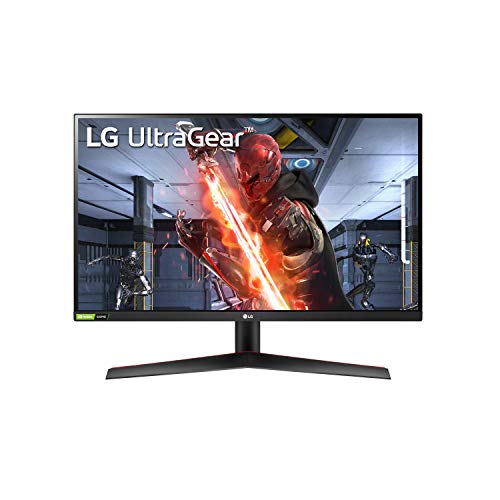
LG 27GN800-B Ultragear 27 inch QHD (2560x1440) IPS 144Hz 1ms Gaming Monitor AMD FreeSync Premium G-Sync Compatible HDR10 HDMI DisplayPort Black
$379.99observed
Lowest we have recorded: $296.99 on (15 weekly checks)
Specs head to head
| Spec | ASUS TUF Gaming VG27AQA1A | LG 27GN800-B UltraGear |
|---|---|---|
| Screen size | 27 inches | 27 inches |
| Resolution | QHD (2560 x 1440) | QHD (2560 x 1440) |
| Panel type | VA | IPS (BOE) |
| Refresh rate | 170Hz (DisplayPort), 144Hz (HDMI) | 144Hz |
| Response time | 1ms MPRT (manufacturer figure) | 1ms GtG (manufacturer figure) |
| Adaptive sync | AMD FreeSync Premium | FreeSync Premium and G-Sync Compatible |
| Ports | DisplayPort 1.2, 2x HDMI 2.0 | DisplayPort 1.4, 2x HDMI 2.0 |
Our take on each
ASUS TUF Gaming VG27AQA1A
Best for: A dark room, where deep blacks matter more than perfect viewing angles.
This is the monitor that makes the rest of the guide argue for itself. You get 27 inches at 2560x1440 and 170Hz over DisplayPort (144Hz over HDMI), on a VA panel ASUS rates at 3000:1 native contrast. In a dark room that number is the whole story: black bars stay black and night scenes keep their depth instead of glowing grey the way a budget IPS does.
Motion is handled by FreeSync Premium plus ELMB backlight strobing, and ASUS adds Shadow Boost, which lifts dark-area gamma so figures in shadow are visible without brightening the whole image. Two HDMI 2.0 inputs and DisplayPort 1.2 cover a PC and a console.
The VA compromises are the ones VA always has. Dark-to-dark transitions are slower than light ones, so fast movement in dark scenes leaves a smear that IPS and OLED do not. Colors shift when you sit off center, which matters if two people watch. The stand tilts only, with no height, swivel or pivot, so most buyers end up on a VESA arm. And the HDR10 support is a format badge rather than a capability: there is no local dimming and the panel does not get bright enough for HDR to look like anything.
LG 27GN800-B UltraGear
Best for: Someone who wants IPS color and viewing angles, and both sync certifications on one panel.
The 27GN800-B is the IPS answer to the ASUS, and the case for it is viewing angles and color consistency. An IPS panel holds its color and contrast when you move off axis, which a VA does not, so it is the better monitor for a desk two people share or for work that involves judging color. It covers roughly 99% of sRGB and runs 1440p at 144Hz with low input lag.
It is also the only pick here carrying both certifications: AMD FreeSync Premium and NVIDIA G-Sync Compatible, so adaptive sync works out of the box regardless of which card you own.
Two things you should know before buying. First, the age: LG launched this monitor in October 2020, and this specific model uses a BOE IPS panel rather than the Nano IPS found in LG's more expensive UltraGear screens. Second, the contrast: like most IPS panels of this class it sits near 1000:1, so blacks read as dark grey next to the ASUS, and its HDR10 badge means as little as the ASUS one does. The stand tilts only. At the price we have recorded, buy this for the IPS panel specifically, not as a general upgrade over the budget pick.
More from this guide
We may earn a commission from qualifying purchases made through links on this page, at no extra cost to you. Commissions never change our picks.