Best Gaming Monitors at Every Budget

Updated 2026-06-23

How we pick: we research the specs, read real owner reviews, and weigh the honest trade-offs. Real pros and cons, no paid placements, and commissions never change our rankings.

A great gaming monitor does more for your experience than almost any other upgrade, and you do not need to spend a fortune to feel the difference. The jump from a basic 60Hz panel to a fast 144Hz or 170Hz display is the kind of change you notice the second you move your mouse.

We focused on three sweet spots: a wallet-friendly QHD pick, a sharp IPS workhorse for most players, and a big 4K screen for people who want it all. Each one is honest about its tradeoffs, because no monitor at these prices is perfect.

How we picked

  • Real refresh rate and response that hold up in fast games, not just marketing numbers
  • Panel quality and adaptive sync support (FreeSync and G-Sync Compatible) verified against independent testing
  • Genuine value at each price, including the stuff that disappoints (HDR, stands, contrast)
Editor's Choice

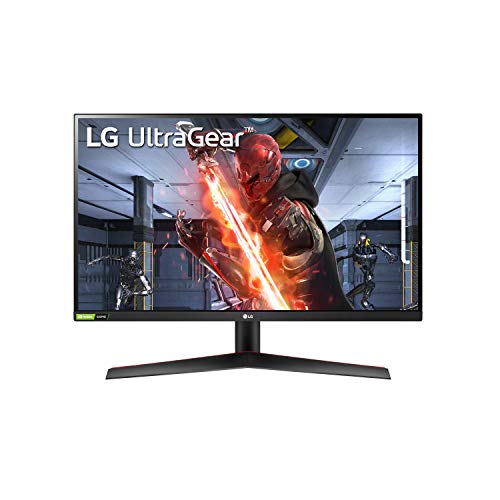
LG 27GN800-B Ultragear 27 inch QHD (2560x1440) IPS 144Hz 1ms Gaming Monitor AMD FreeSync Premium G-Sync Compatible HDR10 HDMI DisplayPort Black

Best for: The majority of players who want sharp colors, wide viewing angles, and snappy motion without overpaying.

The all-rounder most gamers should buy: a fast, accurate IPS panel at QHD that nails the price-to-performance balance.

Check price · $379.99

Our take

I have run all three situations: a cheap VA, a fast IPS, and a big 4K. The honest takeaway is that the value IPS is the one I would buy again first. The VA blacks are lovely in a dark room, but the smear annoyed me in fast shooters. The 4K is gorgeous, but it ate my GPU alive.

If you are unsure, get the 27-inch QHD IPS. It is the sweet spot of sharpness, speed, and price, and you will not feel like you compromised.

How to choose gaming monitors

A gaming monitor balances sharpness, smoothness, and panel quality. Decide these in order:

  • Resolution and size: 1080p is fine up to 24 inches, 1440p is the sweet spot at 27 inches, and 4K shines at 32 inches and up. Match resolution to size or things look soft or cramped.
  • Refresh rate: 144Hz is the baseline that makes everything feel smoother. 165Hz and beyond is gravy. Competitive shooters benefit most.
  • Panel type: IPS for the best color and viewing angles (most people), VA for deeper contrast, TN only if you chase the absolute lowest latency.
  • Response and sync: look for low gray-to-gray response (1ms class) to limit smearing, and FreeSync or G-Sync support to kill tearing.
  • Connections: confirm the port and cable can carry your target resolution and refresh (DisplayPort or HDMI 2.1 for high-refresh 4K).

Pick the resolution your GPU can actually drive at a high frame rate. A 4K panel at 30fps feels worse than a sharp 1440p at 144Hz.

At a glance

The full breakdown

Budget Pick8.2 / 10

ASUS TUF Gaming 27” 1440P Monitor (VG27AQA1A) - QHD (2560 x 1440), 170Hz (Supports 144Hz), 1ms, Extreme Low Motion Blur, Freesync Premium, Eye Care, HDMI, DisplayPort, Shadow Boost, Speakers, HDR

Best for: Budget players who watch in dark rooms and want inky contrast more than perfect viewing angles.

This is the monitor for anyone who wants QHD at 170Hz without paying IPS money. The VA panel is its whole personality: contrast lands around 3000:1, so blacks look genuinely black and dark scenes have real depth that cheap IPS screens cannot match.

The catch is the usual VA tradeoff. Fast, dark transitions can smear a little, and viewing angles fade if you sit off-center. ELMB and FreeSync Premium help motion feel clean for the price, but competitive players chasing the last few milliseconds will notice it is not an IPS.

The stand is the other compromise. You get tilt only, no height adjustment, so plan on books or a VESA arm. HDR10 is supported but it is the basic, checkbox kind, not a real HDR experience. For the cost, none of that ruins what is a sharp, punchy gaming display.

What we like

  • + QHD at 170Hz for a budget price
  • + High native contrast (around 3000:1) for deep blacks
  • + FreeSync Premium plus ELMB for clean motion
  • + Shadow Boost helps spot enemies in dark scenes
  • + Built-in speakers included

Watch outs

  • - VA panel can smear on fast, dark transitions
  • - Tilt-only stand with no height adjustment
  • - HDR is the checkbox kind, not a real upgrade
  • - Viewing angles trail an IPS panel

Full specs

Screen size27 inches
ResolutionQHD (2560 x 1440)
Panel typeVA
Refresh rate170Hz (DisplayPort), 144Hz (HDMI)
Response time1ms MPRT
Adaptive syncAMD FreeSync Premium
HDRHDR10 (basic)
PortsDisplayPort 1.2, 2x HDMI 2.0
Street price (approximate)Approximately 170 to 200 USD
Best ValueEditor's Choice8.8 / 10

LG 27GN800-B Ultragear 27 inch QHD (2560x1440) IPS 144Hz 1ms Gaming Monitor AMD FreeSync Premium G-Sync Compatible HDR10 HDMI DisplayPort Black

Best for: The majority of players who want sharp colors, wide viewing angles, and snappy motion without overpaying.

This is the safe, smart pick for most people. The 27-inch IPS panel runs QHD at 144Hz with a genuinely quick 1ms response, and it covers around 99% of sRGB, so colors are accurate and viewing angles stay clean from any seat.

It is a proper dual-purpose screen. Games feel responsive thanks to low input lag and both FreeSync Premium and G-Sync Compatible support, and the sharp QHD resolution makes everyday work and browsing pleasant too.

The weak spots are predictable for an IPS at this price. Contrast sits near 1000:1, so blacks look gray next to a VA, and the HDR is mediocre because peak brightness and contrast are just too low to do it justice. The stand is also poor, offering tilt only, so a monitor arm is a worthwhile add. None of that dents the core value.

What we like

  • + Sharp, accurate IPS color with wide viewing angles
  • + 144Hz with a fast 1ms response and low input lag
  • + Both FreeSync Premium and G-Sync Compatible
  • + Great all-around pick for gaming and daily use
  • + Strong, consistent value at QHD

Watch outs

  • - Low contrast (around 1000:1) means grayish blacks
  • - HDR is mediocre due to limited brightness
  • - Tilt-only stand with poor ergonomics

Full specs

Screen size27 inches
ResolutionQHD (2560 x 1440)
Panel typeIPS
Refresh rate144Hz
Response time1ms (GtG)
Adaptive syncFreeSync Premium and G-Sync Compatible
HDRHDR10 (mediocre)
Color gamut99% sRGB
PortsDisplayPort 1.4, 2x HDMI 2.0
Street price (approximate)Approximately 200 to 250 USD
Premium Pick9.0 / 10

LG 32" Ultragear 4K UHD (3840x2160) Gaming Monitor, 144Hz, 1ms, VESA DisplayHDR 400, G-SYNC and AMD FreeSync Premium, HDMI 2.1, DisplayPort, 4-Pole HP Out DTS HP:X, Tilt/Height/Pivot Stand, Black

Best for: Players with a strong GPU or a PS5 who want maximum sharpness and screen real estate.

If you want the full experience, this is it. A 32-inch 4K IPS panel at 144Hz is a stunning amount of detail and space, and the image is crisp, colorful, and wide-angle thanks to the IPS panel covering roughly 95% of DCI-P3.

The standout is dual HDMI 2.1, which means 4K at 120Hz on a PS5 or Xbox Series X with no compromises, plus DisplayPort 1.4 for PC. The stand is also a real one here, with tilt, height, and pivot, so you can set it up properly out of the box.

It is not flawless. DisplayHDR 400 is entry-level HDR that adds brightness but no real local dimming punch, and there are no built-in speakers. Contrast is also typical-IPS, so blacks are not VA-deep. Driving 4K at 144Hz demands a serious GPU too. Accept those and you get one of the best value 4K gaming screens around.

What we like

  • + Crisp, immersive 32-inch 4K IPS at 144Hz
  • + Dual HDMI 2.1 for 4K 120Hz on PS5 and Xbox
  • + Fully adjustable stand (tilt, height, pivot)
  • + Wide DCI-P3 color and excellent viewing angles
  • + FreeSync Premium and G-Sync Compatible

Watch outs

  • - DisplayHDR 400 is entry-level, not true HDR
  • - No built-in speakers
  • - Typical IPS contrast, so blacks are not VA-deep
  • - 4K at 144Hz needs a powerful GPU

Full specs

Screen size31.5 inches
Resolution4K UHD (3840 x 2160)
Panel typeIPS
Refresh rate144Hz (120Hz on consoles)
Response time1ms (GtG)
Adaptive syncFreeSync Premium and G-Sync Compatible
HDRVESA DisplayHDR 400 (entry-level)
Color gamut95% DCI-P3
Ports2x HDMI 2.1, DisplayPort 1.4, 2x USB 3.0, headphone out
Street price (approximate)Approximately 550 to 600 USD

Compare these head to head

Frequently asked questions

Is 1440p (QHD) or 4K better for gaming?

1440p is the sweet spot for most: sharp and far easier to run at high frame rates. 4K looks stunning but needs a powerful GPU to hit high refresh, which is why our premium 4K pick suits strong rigs and consoles.

IPS vs VA panel, what is the difference?

IPS has the best color and viewing angles with fast response, but weaker contrast (grayish blacks). VA has deeper blacks and contrast but can smear on fast dark transitions. We pick IPS for most, VA for dark-room value.

How many Hz do I need for gaming?

144Hz is the practical sweet spot and a massive upgrade over 60Hz. The 170Hz on our budget VA is a small bonus. Beyond that, returns shrink unless you play competitive shooters.

Do these monitors work with a PS5 or Xbox?

Yes. The premium LG 32-inch has HDMI 2.1 for 4K at 120Hz on consoles. The QHD picks run consoles fine too, at their HDMI refresh limits.

Is the HDR on budget gaming monitors any good?

Mostly no. Entry monitors carry an HDR badge but lack the brightness and local dimming to do it justice, so treat HDR as a checkbox, not a reason to buy, at these prices.

More buying guides

We may earn a commission from qualifying purchases made through links on this page, at no extra cost to you. We only recommend products we would tell a friend to buy, and commissions never change our picks.